
One Covet for Claude
Pokémon card market data, right inside Claude.
Connect
On a computer
- In Claude, open Plugins and select the Connectors tab: https://claude.ai/plugins?filter=connectors-only
- Click Add → Add custom connector.
- Name it One Covet, enter this URL:
https://mcp.onecovet.com/mcpand click Continue.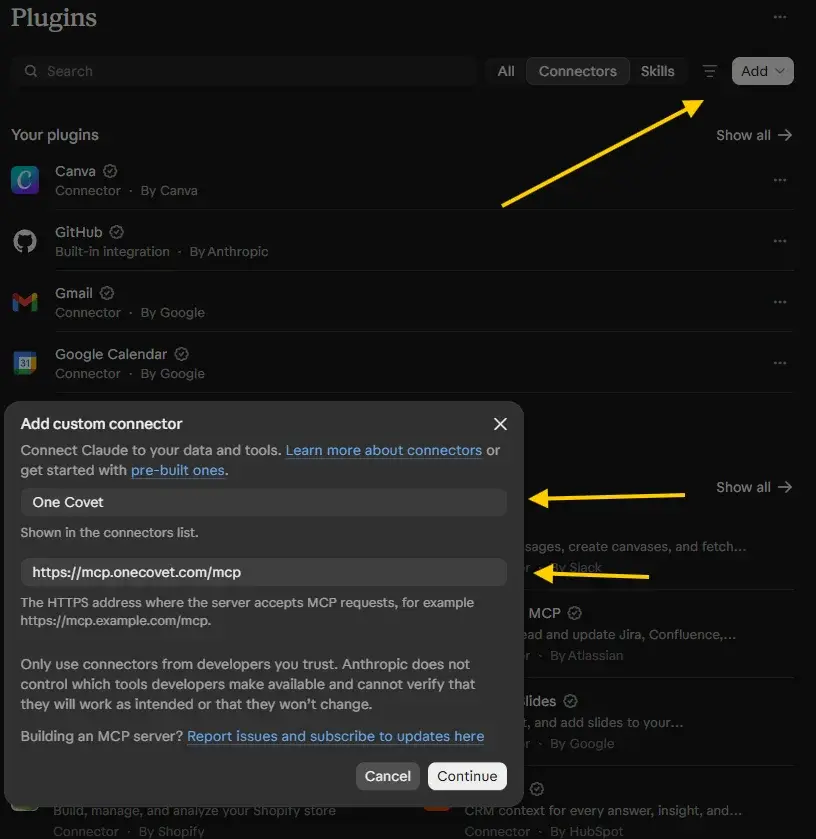
- Sign in with your One Covet account and click Allow.
On your phone (beta)
- Open the Claude app and tap your account (your initials).
- Scroll down and tap Connectors, then tap the + in the top right.
- Tap Add custom connector.
- Name it One Covet, enter this URL:
https://mcp.onecovet.com/mcpand tap Continue.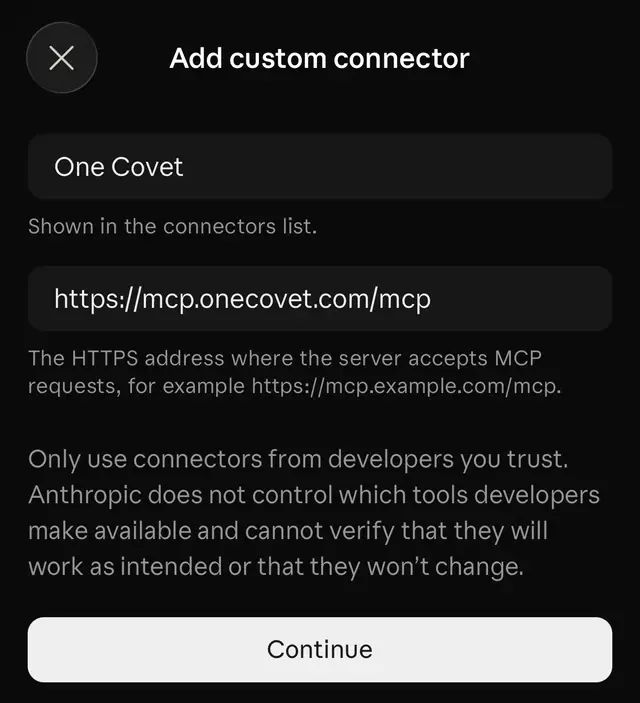
- Sign in with your One Covet account and tap Allow.
Adding connectors in the Claude app is still in beta. If you don't see Connectors or Add custom connector, use the steps for a computer instead.
Once One Covet is listed in Claude's connector directory, you can simply search for "One Covet" there instead of adding it by URL.
What it does
Ask Claude about Pokémon cards and it answers with One Covet data:
- Card values, raw and graded
- Price charts and how a card has moved over time
- Live listings and the best current deals
- The One Covet Pokémon market index
- Your portfolio: see how it's doing, and add, edit or sell cards just by asking (Pro plan)
Requirements
- A free One Covet account
- Portfolio features require the Pro plan
Example questions
- "What's a PSA 10 Moonbreon worth?"
- "How has Base Set Charizard PSA 9 moved this year?"
- "How is the Pokémon market doing?"
- "Is vintage outperforming modern?" Pro
- "Show me the best deals on PSA 10 Charizards."
- "How is my portfolio doing?" Pro
- "Add a raw Moonbreon to my Chase Cards portfolio." Pro
Privacy and support
Claude never shares your conversation with us. See the Claude connector section of our Privacy Policy for exactly what we receive and how long we keep it.
Questions or problems? Email [email protected], or use our contact form.
© 2026 One Covet. All rights reserved.